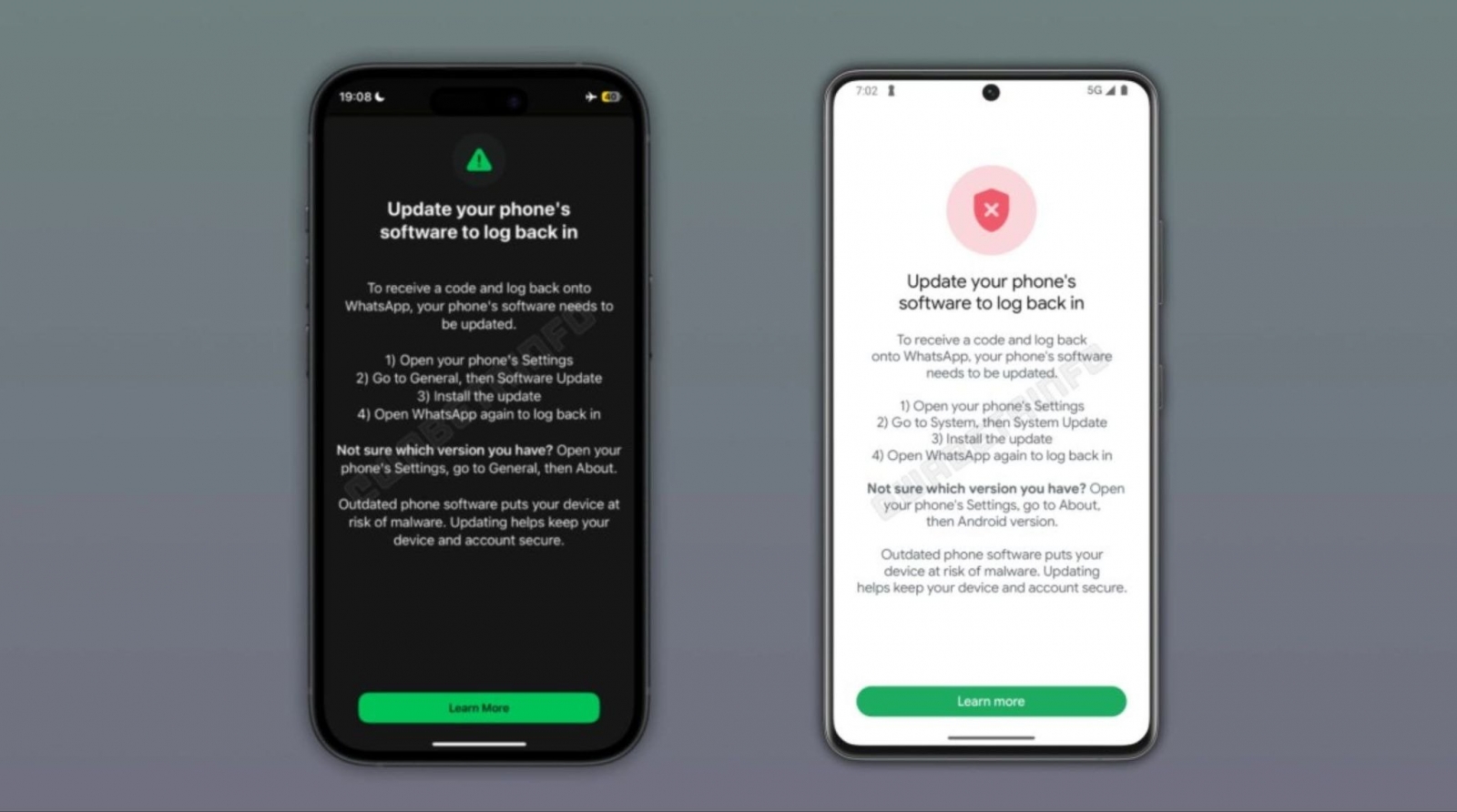
WhatsApp is beginning to block sign-ins for some users whose phones run outdated versions of Android or iOS. The restriction is being rolled out gradually through a server-side update, according to WABetaInfo, so it can appear regardless of the WhatsApp app version installed on a device.
Affected users are shown a screen requiring them to update their phone’s operating system before continuing. The prompt cannot be bypassed to complete the sign-in process; after installing the latest available system update, users can attempt to log in again.
The move is tied to device security. WhatsApp’s end-to-end encryption protects communications in transit, but data may still be exposed before encryption if the phone itself has been compromised. WhatsApp has not disclosed the exact Android or iOS versions that trigger the new login block, nor has it confirmed a complete list of affected models.
That undisclosed login threshold is separate from WhatsApp’s published compatibility requirements. The service currently supports Android 6.0 or later and iOS 15.1 or later. On November 30, 2026, the iPhone requirement will rise to iOS 15.5.
- iPhone 5s: Cannot install iOS 15.1 and is already below WhatsApp’s current iPhone requirement.
- iPhone 6: Cannot install iOS 15.1 and is already below WhatsApp’s current iPhone requirement.
- iPhone 6 Plus: Cannot install iOS 15.1 and is already below WhatsApp’s current iPhone requirement.
- iPhone 6s: Can remain compatible if it is running a qualifying iOS version.
- iPhone 6s Plus: Can remain compatible if it is running a qualifying iOS version.
- First-generation iPhone SE: Can be updated to an iOS 15 release that also meets the November 2026 iOS 15.5 threshold.
- iPhone 7: Requires an update check if it is still running a version earlier than iOS 15.5.
- iPhone 7 Plus: Requires an update check if it is still running a version earlier than iOS 15.5.
- Samsung Galaxy S5, including the SM-G900F variant: Received Android 6.0.1, but units still on Android 5 must be updated to meet the current minimum.
An older phone does not automatically need to be replaced. iPhone owners can check Settings > General > Software Update, while Android users can look for Software Update or System Update, depending on the manufacturer. The key unresolved detail is which software versions will be caught by the new server-side login check before they fall below WhatsApp’s formal compatibility floor.