Some iPhone users say Apple Intelligence is claiming between 9GB and 16GB of storage after installing iOS 27, a potentially significant hit on 128GB devices. In those cases, iOS and its AI components can take up roughly 30% of total storage before accounting for space reserved for software updates.
Simply disabling Apple Intelligence or Siri does not appear to remove the allocated files. However, a workaround shared on Reddit changes Siri’s language variant, then restarts the iPhone. GSMArena reports that testing the method with English (South Africa) reduced Apple Intelligence storage usage to about 100MB.
- Open Settings and go to Siri, or Apple Intelligence & Siri, depending on the iOS version.
- Open the Language section.
- Select English (South Africa).
- Alternatively, select English (Canada).
- Alternatively, select English (Ireland).
- Alternatively, select English (New Zealand).
- Restart the iPhone and check available storage.
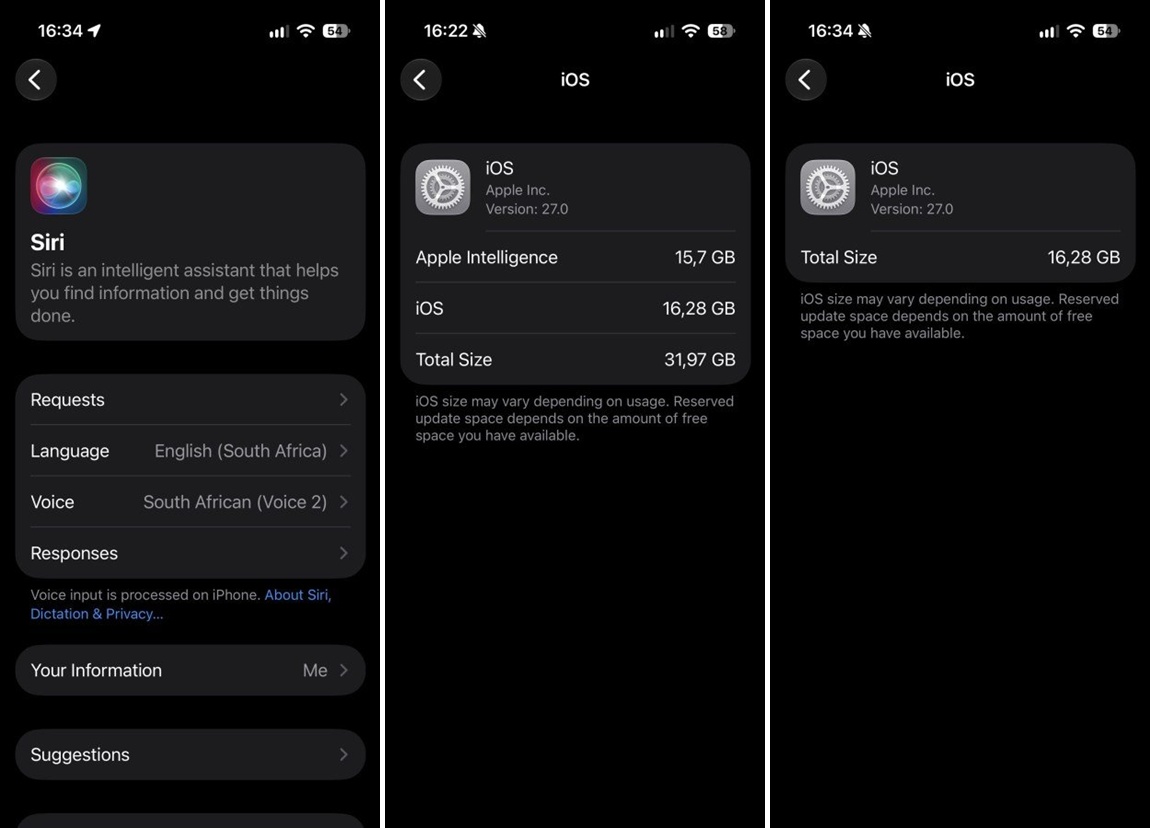
The workaround is unofficial, and results may vary by device and software configuration. Changing Siri’s language may also disable some Apple Intelligence features, although Siri can still be used in English. Apple has not confirmed why the reported storage allocation occurs or whether a future iOS 27 update will address it.